

Configure secure token
Do the first three steps in Gcore Customer Portal on the Secure token tab.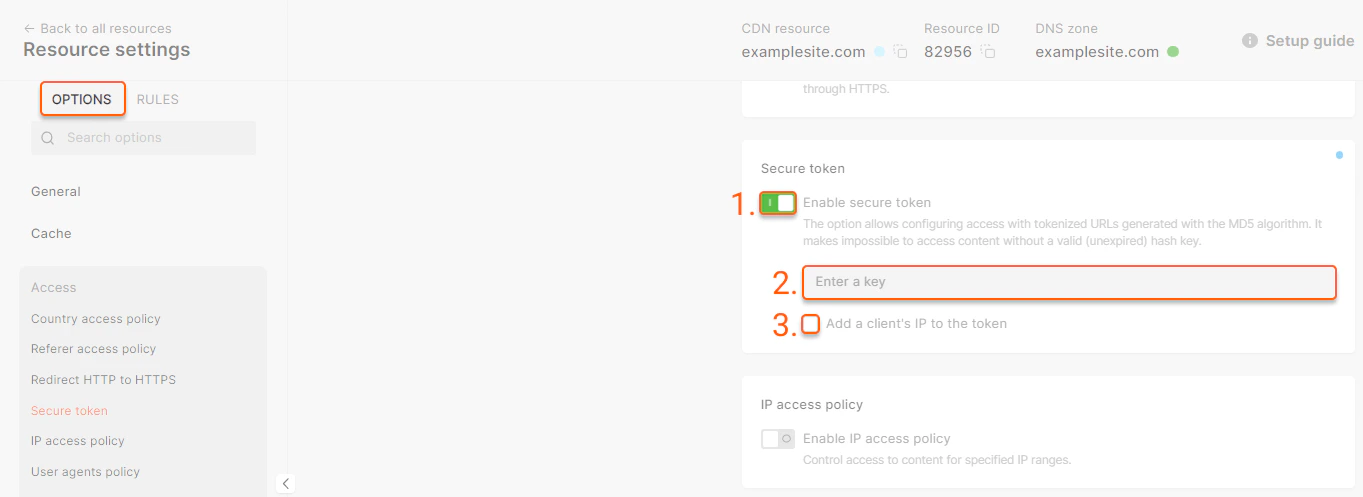

http://cdn.example.com/photo.jpegis the path to the file,DMF1ucDxtHCxwYQis the output of the “MD5(String)” hash function, where String is the parameter obtained by merging elements:<link expiry time><file path><allowlisted IP address><key from Step 2>,2147483647is the time in the UNIX timestamp format until which the link is considered valid.
How secure token URL matching works
Secure Token validates three things from the request URL:md5: the token hash.expires: the Unix timestamp until which the URL is valid.- Path: the file path or directory path that was used when the token was generated.
Token for exact file
Use an exact file token for standalone files such as images, archives, MP4 files or one protected video manifest when you do not need to authorize nested requests with the same token. Example protected file:/images/poster.jpeg. This token does not provide access to adjacent files, for example:
Token with Query String Forwarding
Use a token with Query String Forwarding enabled for HLS and MPEG-DASH when the player must request a master manifest, nested rendition manifests, media segments, and subtitles under the same path. In this mode, do not include a filename in token generation. Generate the token for the full directory path only. For example, for files in:/videos/video-1/. It does not work for files in subdirectories such as /videos/video-1/360p/. If your HLS or MPEG-DASH files are split across subdirectories, generate and use tokens for those directories separately or place the related manifests and segments under one directory.
Example HLS files:
- manifest URL: master.m3u8
- hls.js player demo: master.m3u8
Token in a path
Tokens embedded into the URL path are not supported for now by CDN natively. This option is available for Gcore Video Streaming:https://demo-protected.gvideo.iois the CDN URL,/videos/2675_pG8TfmKx2LU2qs/is the video ID,rI1224fiE3USCa8qYnMuGQis the token,1861919999is the expiration time in the UNIX timestamp format until which the link is considered valid.
Scripts for link generation
Generate links with a secure token in PHP
Below is the script for creating temporary links with the IP-based access restriction. The files will be accessible only from an allowlisted IP address and only until the link expires.- $secret is the secret key,
- $path is the path to the file,
- $ip is the IP address that is allowed to access the content,
- $expires is the link expiry time (in seconds),
- $url is the address of the file.
Generate links with a secure token in Python
The script for creating temporary links with the IP-based access restriction. The files will be accessible only from an allowlisted IP address and only until the link expires.- secret is the secret key,
- path is the path to the file,
- ip is the IP address that is allowed to access the content,
- expires is the link expiry time (in seconds),
- secured_url is the link to the file.
Generate a secure token in OpenSSL
The script for creating a secure token that limits the link lifespan and allows access only to an allowlisted IP:- 2147483647/images/1.jpg is the path to the file,
- 1.2.3.4 is the IP address that is allowed to access the content,
- secret_key is a secret key you specified at Step 2 of the Configure Secure Token instruction.
- http://cdn.example.com/photo.jpeg is the path to the file,
- DMF1ucDxtHCxwYQ is a secure token,
- 2147483647 is the time in the UNIX timestamp format until which the link is considered valid.
IP binding and mobile networks
When you bind a secure token to the client’s IP address, the CDN recomputes the hash using the IP address it sees on the incoming request. This becomes a problem on some mobile networks. In certain countries, mobile ISPs change a subscriber’s public IP address very aggressively — sometimes within minutes — because they route many subscribers through carrier-grade NAT (CGNAT) and rotate addresses across a pool. A token signed for one IP fails as soon as the carrier moves the user to another. The effect is most visible with Query String Forwarding for video. The player requests the manifest, gets a token, and the token is forwarded to the related sub-segments. If the mobile ISP switches the client IP between requests, the next segment is downloaded from a different IP and returns403, while earlier segments returned 200. So a single user can receive 200 and 403 responses almost simultaneously, and this is a strong indicator that the cause is mobile IP rotation rather than an expired or malformed token.
If you observe this pattern — 200 and 403 mixed together for the same user on a mobile network — we can change the default token behavior from binding to a dedicated IP to binding to a wider subnet mask, such as /24 or even /16 for very aggressive mobile operators. A wider mask still ties the URL to the user’s ISP block (so external sharing and hotlinking remain blocked) while tolerating IP rotation within that block.
This option is available for Enterprise customers. To enable it, contact our support team or your account manager.